Measure Tennis String Tension From Your iPhone
Tap the stringbed, and acoustic analysis turns the vibration into a tension reading in about 30 seconds — no hardware, no guessing. Then track how that number drifts after every match, build a baseline for each racquet, and know when it's time to restring.
Free to measure · No account required · First reading in ~30s
Illustrative signal and model quality indicator, not percentage accuracy versus a stringing machine.
No accessory — just your iPhone · First reading in ~30 seconds · 100% on-device & private · Free to measure.
How do you measure tennis string tension?
Common ways to evaluate tennis strings include recording the stringing machine's reference tension, using an acoustic phone app, sampling local strings with a mechanical tension tester, or measuring whole-stringbed stiffness with an electronic DT device. These methods do not all report the same quantity. Checking the machine's pulling force is a separate task for a machine calibrator.
Tension Decay Estimator LIVE
See the tension your strings are likely holding after a stretch of play, by string type. For your real racquet, measure it in String Tension AI.
Educational model — not a measurement. Based on general tension-loss data (Sources: My Tennis HQ; Tennis Warehouse University). Your real results depend on string, racquet, gauge, swing speed, and conditions.
Can an iPhone measure tennis string tension?
Yes. When you tap a strung racquet, the stringbed vibrates at a frequency tied to its tension — higher tension rings at a higher pitch, the same principle a piano tuner relies on. String Tension AI captures that response, applies signal and quality checks, and produces a modeled current-tension estimate. The value isn't one perfect number; it's repeatable readings and the trend they reveal over time.
How to measure with String Tension AI
- Baseline at stringing. Measure right after a fresh string job to set the fresh-string baseline for that racquet.
- Calibrate to a reference. Calibrate to a known reference tension, or use one of the app's 165 built-in string profiles.
- Tap & analyze. Tap the strings 3–10 times; the Quality Coach rejects bad taps so only trustworthy readings count.
- Re-measure after play. Measure again after matches and practice to capture how tension is changing.
- Watch the trend. Follow the tension trend across readings instead of reacting to a single number.
- Decide from data. The Tension Advisor predicts the window so you restring on evidence, not guesswork.
Why a tension history beats a single reading
A single tension reading is useful. A history is powerful.
| One-time reading | Tension tracking over time |
|---|---|
| Shows an estimated current tension | Shows how your racquet is changing |
| Helpful right after a fresh string job | Helpful after every practice and match |
| Easy to forget | Saved to racquet history |
| No trend | Tension loss, playing hours, setup lifespan |
| Good for curiosity | Good for restring decisions |
How to measure consistently
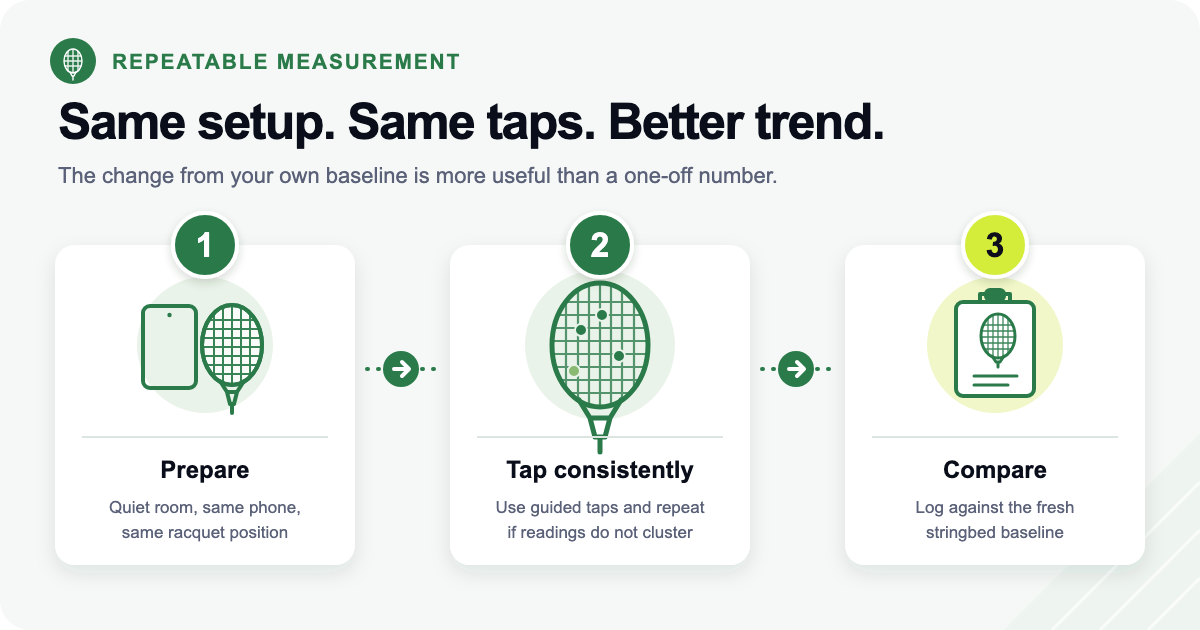
Consistent inputs give you a trend you can trust. A few habits make every reading comparable:
- Start with a fresh-string baseline for each racquet.
- Measure in a quiet environment so background noise doesn't muddy the signal.
- Use the same tapping routine every time.
- Watch the measurement-quality feedback and re-tap when it's low.
- Track playing hours alongside tension, not just the number.
- Compare against your own preferred range — not a universal rule.
The real story isn't tension — it's tension loss
From the moment your racquet leaves the stringing machine, the strings start shedding tension. How fast depends on material, gauge, strung tension, and hours of play — which is exactly why your own history beats any single rule of thumb.
Sources: polyester can shed ~10% of tension in the first 24 hours (My Tennis HQ); strings can lose ~20 lbs (9.1 kg) in ~20 hits in test conditions (Tennis Warehouse University); ~52 lbs (23.6 kg) is a commonly cited power-vs-control dividing line (ReString). Figures are directional, not guarantees.
| Fresh strings | Strings worth tracking closely |
|---|---|
| Close to your fresh-string baseline | Noticeably below your baseline |
| More predictable response | Depth/control feel less predictable |
| Good moment to calibrate & start tracking | Good moment to compare tension, hours, feel |
| Useful reference point | Useful restring decision point |
| Easier to trust in matches | May feel dull, boardy, loose, or inconsistent |
When to measure for the cleanest history
| Moment | Why it matters |
|---|---|
| Right after restringing | Creates your fresh-string baseline |
| ~24 hours later | Captures the early tension drop |
| After each match / practice | Connects tension loss to playing hours |
| Before important matches | Confirms the racquet still feels match-ready |
| When shots start flying long | Checks whether feel matches the data |
| Before your next restring | Improves the next setup decision |
Make the habit automatic
A measurement history is only as good as its consistency, and the hardest part is remembering. In String Tension AI, four reminder families handle that for you and are on by default: a restring reminder, a tension-check interval you set, a baseline prompt in the days after a restring, and a calibration nudge when recalibrating would help. A String Status widget keeps the current reading on your Home Screen or Lock Screen, and Siri Shortcuts cover measuring, checking a racquet, logging a session, and opening a racquet's history without unlocking a menu.
Playing hours are the other half of the record. Sessions can be logged by hand or imported from Apple Health, where tennis workouts you already track land in a review inbox and become playing sessions once you keep them. Pairing hours with readings is what turns "my strings feel off" into a curve you can read.
Tension Loss & Cost-Per-Hour Calculator
Enter your fresh-string baseline and current measurement to see how much tension your strings have lost — and your cost per playing hour.
Estimates are based on your inputs. Actual playability depends on string type, racquet, gauge, swing speed, climate, and personal preference.
What to do with the number
When should you restring?
Restring when your racquet drifts outside your preferred range — not only when a string breaks. The clearest signals:
- Shots start flying long.
- Control feels unpredictable.
- The stringbed feels dull, loose, or boardy.
- You're altering your swing to compensate.
- Tension has dropped below your target.
- Playing hours are near this setup's normal lifespan.
Want the full breakdown? See how String Tension AI helps you decide when to restring.
Can a phone app replace a stringing machine?
No — it isn't a replacement for a professional stringing machine. It's a consistent tracking tool: measure the same racquet over time, build a baseline, monitor tension loss, compare setups, and decide from your own history. Used that way, a phone gives you something a machine never does — a running picture of what your strings are doing between restrings.
Who measures string tension — and why
League & club players
Want week-to-week predictability and a racquet that feels the same on match day.
Poly users
Poly changes fast — track hours and tension together to catch the drop-off.
Players with multiple racquets
Compare setups side by side and keep every frame in its range.
Home stringers & gear testers
Measure at stringing, at 24 hours, and after play to map real decay.
Junior parents & coaches
Manage racquets, costs, and consistency across a growing player.
4 ways to measure string tension
A machine tells you where you started; a phone app tells you where you are now.
| Method | What it tells you | Typical cost | Best for |
|---|---|---|---|
| Stringing machine | Reference tension at the moment of stringing | $200–$1,000+ | Setting the baseline |
| Electronic tension meter | A spot reading of stringbed stiffness | ~$200–$300 (e.g. ERT 300) | Bench checks |
| iPhone app (acoustic) | Repeatable readings + the trend over time | Free to measure | Tracking change |
| Squeeze / feel test | A rough sense of "tighter or looser" | Free | Quick guesses |
The phone app is best used as a consistent tracker — calibrate against a known reference for your most reliable numbers.
Quick tension reference
Pick a starting tension, then measure what actually happens. Higher tension leans toward control; lower leans toward power and comfort.
| String type | Typical starting range (lbs / kg) |
|---|---|
| Natural gut / nylon | ~50–60 lbs (22.7–27.2 kg) |
| Hybrid (gut / poly) | ~46–56 lbs (20.9–25.4 kg) |
| Polyester (co-poly) | ~44–54 lbs (20.0–24.5 kg) |
Ranges based on Wilson starting-tension guidance. Pro tensions are reported / estimated / historic — never confirmed — and vary by racquet and source. Shopping for strings? Browse Courtside Tennis. Some links are affiliate links — we may earn a small commission at no extra cost to you.
6 common measuring mistakes
- Measuring once with no baseline to compare against.
- Comparing your number to someone else's racquet.
- Waiting until the strings break to restring.
- Ignoring playing hours when judging tension loss.
- Chasing a pro's tension instead of your own range.
- Expecting a machine-exact number and ignoring the Quality Coach.
Measuring tension: your questions
Can I measure tennis string tension with my iPhone?
Yes. The microphone analyzes your stringbed's vibration after you tap the strings. You get a reading, measurement-quality feedback, and a saved history so you can follow how tension changes over time.
How do tennis string tension apps work?
Through acoustic analysis. Tapping the stringbed produces a vibration tied to tension; the app captures that response, applies signal and quality checks, produces a modeled current-tension estimate, and stores the measurement in your racquet history.
How accurate are phone-based string tension apps?
They are most reliable as consistent trackers of change over time. Calibrate to a known reference (or use a pre-loaded profile) for better consistency; uncalibrated readings are labeled estimates with a profile tier that describes the basis for the estimate. Capture-confidence feedback reflects signal and model quality, not percentage accuracy versus a stringing machine. A phone app is not a replacement for a professional stringing machine. Learn what those comparisons can and cannot establish in the tension app accuracy guide.
Do I need a separate string tension meter?
No. You only need your iPhone's microphone — no clip-on sensor and no Bluetooth device.
How often should I measure?
Take a baseline right after restringing, then measure after matches and practice. The trend over time — not any single number — is what tells you when to restring.
How much tension do tennis strings lose?
All strings lose tension. Polyester loses fastest and natural gut holds best; the amount depends on material, gauge, strung tension, playing hours, and impacts. Tracking your own racquet history is more useful than any universal rule.
When should I restring my tennis racquet?
Restring when your racquet drifts outside your preferred range, control becomes unpredictable, shots start flying long, or it no longer feels match-ready — not only when a string breaks.
How many hours do poly strings last?
There is no universal number. Poly lifespan depends on swing speed, string model, gauge, tension, and conditions — track playing hours and tension loss together to learn when your specific setup stops feeling match-ready.
What string tension should I start with?
Use the manufacturer's range as a starting point (Wilson suggests roughly 50–60 lbs (22.7–27.2 kg) for nylon and natural gut, with polyester strung looser), then measure what actually happens to your racquet over time.
Can String Tension AI track string cost per hour?
Yes. Using your string jobs, sessions, and restring history it computes cost per playing hour and compares setups by performance, lifespan, and cost. This is a PRO feature.
Is String Tension AI free?
Yes. It is free to download with unlimited core measurements. PRO adds unlimited racquets, full history, predictive insights, advanced recommendations, cost analytics, exports, and iCloud sync.
Why repeatable baselines matter
Published work distinguishes a stringer’s reference setting from the changing behavior of the installed stringbed. This guide therefore emphasizes repeated measurements under comparable conditions, not a one-off claim of machine equivalence. See our editorial standards.
Stop guessing. Start measuring.
Measure in ~30 seconds, build a baseline, track tension loss, and know when to restring. Free to measure.
No accessories · Free core measurements · First reading in ~30s
iPhone · iOS 17+ · Android coming soon — get notified below.
Not on iPhone, or not ready yet? Get product updates and Android availability news — no spam.
We'll only use your email to send the updates you ask for — no spam. See our Privacy Policy.