Tennis String Tension App for iPhone
String Tension AI helps tennis players measure racquet string tension from their iPhone, track tension loss over time, and know when it is time to restring.
Tap your stringbed, let your iPhone analyze the stringbed vibration, and get a tension reading in seconds. Then keep measuring after restringing, practice sessions, matches, and weeks of play so you can see how your strings are actually changing.
Free core measurements · No external hardware · Built for tennis players who want better restring decisions from real measurement history.
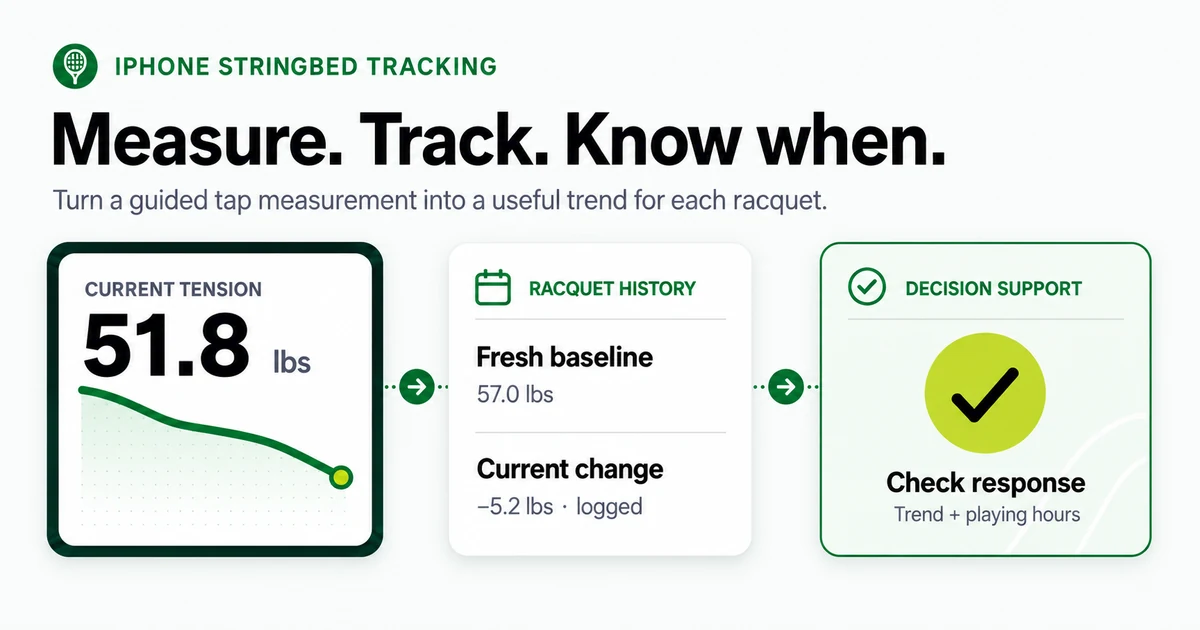
String Tension AI is an iPhone app for tennis players who want to measure racquet string tension, track tension loss over time, and decide when to restring.
The app uses iPhone audio analysis to evaluate stringbed vibration after the player taps the strings.
Comparing your options? See our transparent guide to the best tennis string tension apps.
String Tension AI is best used as a tension tracking and racquet management tool. Players can build a fresh-string baseline, measure after matches and practice, and compare tension trends across string setups.
The goal is not just one reading. The goal is a personal racquet history that shows whether strings are holding tension, dropping normally, or ready to restring.
Why use a tennis string tension app?
Most players know when their racquet feels different. The problem is that "different" is hard to measure.
Maybe your shots are flying long. Maybe your spin feels inconsistent. Maybe your poly strings feel dead, but they have not broken yet. Or maybe you just restrung and want to know how quickly your setup loses tension.
A tennis string tension app gives you a repeatable way to track that change. String Tension AI is built for one job: helping you understand what happens to your racquet between restrings. With regular measurements, you can:
- Build a fresh-string baseline for each racquet.
- Track tension loss after matches and practice.
- Compare different string setups.
- See whether your racquet is still in your preferred range.
- Make smarter restring decisions.
- Learn how many playing hours you get from each string job.
- Track string cost per hour over time.
Measure your racquet from your iPhone
String Tension AI uses your iPhone microphone to analyze the sound of your stringbed vibration. The flow is simple:
- Open the app.
- Hold your racquet near your iPhone.
- Tap the strings.
- Review the measurement quality.
- Save the reading to your racquet history.
No clip-on sensor. No separate tension meter. No extra accessory. The app gives measurement quality feedback so you know whether the tap, background noise, and signal were good enough to trust for consistent tracking.
How much tension do tennis strings lose?
String tension loss is one of the most overlooked factors in tennis performance. From the moment your racquet leaves the stringing machine, your strings begin losing tension — and the rate depends on string material, gauge, strung tension, and how often you play.
Polyester (co-poly) strings are the most popular choice among competitive players, but they also lose tension the fastest. Most polyester strings drop 10–15% of their tension within the first 24 hours after stringing, before a single ball is hit. Over the following weeks, tension continues to decline with every hour of play.
Natural gut holds tension significantly better than polyester, which is one reason tour pros have historically used gut in hybrid setups. Multifilament and synthetic gut (nylon) fall somewhere in between.
All tennis strings lose tension, with much of the loss occurring during and shortly after stringing and during the first hits; polyester generally loses more tension than nylon or natural gut. That is exactly why tracking your own racquet history is more useful than relying on a single universal rule.
Most players have no way to see this change happening. That vague feeling that the racquet "plays different" is often the only signal — and by then, tension may have dropped well below the player's ideal range. String Tension AI makes this invisible process visible. Fresh-string detection identifies your post-restring baseline, and tension tracking shows the week-over-week decline on a chart.
| Fresh strings | Strings ready to track or replace |
|---|---|
| Closer to your fresh-string baseline | Below your preferred tension range |
| More predictable response | Shots may start flying long |
| Easier to trust in matches | Control may feel inconsistent |
| Useful baseline for tracking | Better judged with measurement history |
| Good time to calibrate and measure | Good time to compare cost per hour |
The goal is not to chase a perfect number. The goal is to know when your racquet no longer feels or measures the way you want it to.
String Tension Decay Calculator LIVE
See how different string types lose tension over time based on your playing frequency. For the most accurate trend, measure your own racquet in String Tension AI.
Illustrative estimate using the same first-day settling and playing-hour assumptions as our tension-loss and restring calculators. Estimates stop at 38% loss; real strings can lose more. Later off-court relaxation, individual strings, and conditions are not modeled. Measure your own racquet to guide your restring decision.
When should you restring your racquet?
You should restring when your racquet has moved out of your preferred performance range — not just when the strings break. That range is personal. It depends on your string type, reference tension, swing speed, playing frequency, comfort needs, and how sensitive you are to changes in control, power, spin, and feel.
The most common rule of thumb is to restring as many times per year as you play per week. Play three times a week? Restring at least three times per year. But this does not account for string type, playing intensity, climate, or personal tension preferences. Players using polyester strings and playing frequently often need to restring far more often.
Common signs your strings may be ready to restring:
- Your shots are flying long.
- Control feels less predictable.
- The stringbed feels dull or inconsistent.
- You are adjusting your swing to compensate.
- Your current tension is below your preferred range.
The better approach is measurement. Instead of relying on feel or calendar-based rules, measure your string tension regularly and track the trend. String Tension AI helps you set a baseline immediately after restringing, track tension loss session by session, set a personal target range and get notified when you drop below it, compare how long different setups last, and use the Tension Advisor (PRO) for personalized restring timing.
When you have actual measurement data, restringing stops being a guess and becomes a decision backed by your own racquet history.
How many hours do poly strings last?
There is no single number that fits every player. Poly string lifespan depends on swing speed, string model, gauge, tension, court conditions, and your tolerance for changes in control and feel. For most players, polyester strings deliver their best performance within a window of approximately 10 to 20 hours of active play.
After that window closes, the string's elasticity is significantly reduced. Shots that used to land with controlled depth may start sailing long. The crisp, connected feeling at contact gives way to a "boardy" or "dead" sensation. Arm discomfort can increase as the string loses its ability to absorb shock.
The challenge is that this degradation happens gradually. There is no single moment when the string "dies" — it is a slow decline that many players only notice after it is well underway. The better method is to track playing hours and tension loss together, then learn when your specific setup stops feeling match-ready.
Use the calculator above to model how quickly different string types lose tension based on your weekly playing hours. Then download String Tension AI to measure your actual racquet and build your own data.
What tension do the pros use?
Professional tennis players choose their string tension based on the balance of power, control, spin, and feel they need. Most tour players string between 40 and 65 lbs, with the majority falling in the 48–60 lb range. Here are some notable examples:
| Player | String Setup | Tension (M / X) | Type |
|---|---|---|---|
| Carlos Alcaraz | Babolat RPM Team · 1.3 mm | 55.1 lbs (25 kg) / 52.9 lbs (24 kg) | Poly |
| Jannik Sinner | Head Hawk Touch · 1.3 mm | 61.7 lbs (28 kg) / 61.7 lbs (28 kg) | Poly |
| Iga Swiatek | Tecnifibre Razor Code · 1.25 mm | 52.9 lbs (24 kg) / 52.9 lbs (24 kg) | Poly |
| Coco Gauff | Luxilon ALU Power · 1.25 mm | 52.9 lbs (24 kg) | Poly |
| Novak Djokovic | Babolat VS Touch · 1.3 mm / Luxilon ALU Power Rough · 1.25 mm | 59.1 lbs (26.8 kg) / 56.0 lbs (25.4 kg) | Hybrid |
| Roger Federer | Wilson Natural Gut · 1.3 mm / Luxilon ALU Power Rough · 1.25 mm | 58.4 lbs (26.5 kg) / 55.1 lbs (25 kg) | Hybrid |
Reported setups change with conditions and tournaments. Tensions are approximate snapshots, shown in lbs first with kg second. Explore all 69 sourced setups, evidence links, and verification dates.
Pro tensions are not directly prescriptive for recreational players. Pros have their racquets restrung before every match — sometimes multiple times per day at Grand Slams. Their setups are optimized around the assumption of near-fresh strings. For club and league players who restring less often, understanding how tension drops over time is arguably more important than picking the "right" starting tension. String Tension AI helps you track both.
Track tennis string cost per hour
A restring is not just a performance decision — it is also a cost decision. If a string job costs $40 and gives you 10 strong playing hours, that is $4.00 per hour. If another setup costs $55 but gives you 22 strong playing hours, that is $2.50 per hour. The difference adds up fast for frequent players.
String Tension AI helps players connect tension history, playing sessions, restring cost, and string lifespan so they can make better equipment decisions over time. PRO includes full cost analytics — tracking restring expenses, string costs, stringer fees, and cost-per-hour calculations across all your racquets and setups.
Everything String Tension AI does
Measurement is the core loop, but most of the value comes from what the app keeps around it: racquet records, string jobs, playing hours, reminders, and the trend that connects them. This is the full picture, grouped the way the app is.
Measurement and measurement quality
Tap the stringbed and the app analyzes the resulting sound across several taps to produce one reading. Unlimited measurements are free on every tier.
- Quality Coach. Real-time feedback when the room is too noisy, a tap is too soft, or capture conditions are likely to reduce measurement quality.
- Tap diagnostics. A per-tap breakdown of which taps counted and which were rejected, so an odd reading is explainable rather than mysterious.
- Guided tutorial. A walkthrough of tap placement, phone position, and conditions before your first reading.
- Personal calibration. Calibrate a setup against a reference tension you know, with nudges when a fresh string job makes recalibrating worthwhile.
- Trust marks. Readings captured in conditions the app cannot vouch for are marked, and are kept out of baselines and trend conclusions rather than quietly averaged in.
- Built-in catalogs. 165 string profiles across 21 brands and 338 adult racquet models with head size, weight, balance, swingweight, stiffness, and string pattern.
For what a phone measurement can and cannot support, see tension app accuracy and repeatability, or the practical walkthrough in how to measure tennis string tension.
Compare a phone tension app with mechanical and electronic tension meters to choose the method that fits your measurement question.
Racquets, string setups, and restring records
Every reading is saved against a specific racquet and a specific string job, which is what makes a trend meaningful. A setup records mains and crosses, gauge, reference tension, stringer, cost, and the date strung. Restringing retires the old job and starts a new one, so the history stays segmented instead of turning into one long line. A "Strung At" view lists every string job across every racquet.
The free tier covers one racquet and one active setup, and restringing that racquet is still allowed. Every measurement you take is stored regardless of tier — the free tier displays the newest 20, and upgrading reveals the rest immediately rather than starting your history over.
History, charts, and trend analysis
- History list and tension chart for each racquet and string job.
- Tension decay analysis and restring forecast (PRO) — a projection of where the current job is heading, on a calendar or playing-hours basis.
- Tension Advisor and What-If (PRO) — a suggested tension for the next restring with its adjustment factors shown, plus scenarios for changing surface, frequency, or priorities.
- Tension targets (PRO) — set a range for a racquet and get alerted when a reading falls outside it or is predicted to.
- String job comparison (PRO) — how this job's lifespan, decay rate, and retention compare with the one before it.
- String History screen (PRO) — every retired job for a racquet, with a compare overlay.
- Restring analysis (PRO) — hub-level insight into how old each racquet's strings are and which one needs attention next.
- Cost analytics and budget (PRO) — restring spend, cost per playing hour, and an annual budget view across racquets and setups. The same arithmetic is available to anyone in the browser via the cost-per-hour calculator.
Fresh-string and abnormal-change detection
The app watches your readings for two different events. Fresh-string detection is free: the app segments string jobs, prompts for a baseline in the days after a restring, sends a baseline reminder, and keeps a baseline card on the dashboard until you take one. Abnormal-change detection is PRO: an unusually large drop or a jump that looks like new strings raises a "New Strings Detected" prompt, with follow-up reminders while it stays unresolved.
Strings, recommendations, and shopping
- Pro setups. 69 sourced professional string setups and 29 professional racquet setups across ATP, WTA, and legends, searchable and filterable with last-verified dates. The same string dataset powers our public pro string setups page.
- My Strings. A personal inventory of the strings you own or have used.
- Stringer directory. Save the people who string your racquets and attach them to a job from the restring form. Free.
- Daily tennis facts. 55 collectible facts on a daily rotation, with a collection to fill in.
- String recommendations (PRO). Suggested strings for your priorities and playing context.
- Hybrid builder (PRO). Main and cross combinations with the trade-offs each pairing implies.
- Wishlist (PRO). Keep a list of strings to try next, with reminders.
Playing sessions, goals, and milestones
Hours matter as much as weeks for string life, so the app logs play alongside tension. Session logging is unlimited and free, by hand or with a quick-log shortcut. Weekly goals, progress, and streaks are free, including the streak detail view, the dashboard indicator, and a streak share card. There are 38 milestones across playing hours, session counts, and streak length, in five rarity tiers and seven progression ranks. Milestone unlock celebrations and milestone share cards are free. PRO adds the full milestone gallery, rank-up celebrations, and approaching-milestone nudges. The detailed Playing Stats screen, effective-hours charts, and session CSV export are PRO.
Apple Health import
If you already track tennis in Apple Health, the app can bring those workouts in as playing sessions. The reviewed import pass is free: imported workouts land in an inbox where you keep or remove each one, workouts later removed at the source get their own keep-or-remove pass, and skipped items stay reviewable. Automatic background import is PRO. On both tiers, sessions sourced from Apple Health stay on the device: they are never pushed to iCloud, and they are left out of the backup archive you export and of CSV exports.
String AI Coach
A chat sheet where Apple's on-device model answers questions about your own racquets and strings. It requires iOS 26; the rest of the app runs on iOS 17 and later. Every number, date, and status it shows is rendered from your own records, and the model is not permitted to state a figure it was not given. Free covers string health, racquet setup, and recent readings. PRO adds restring forecast, tension advice, playing stats, cost summary, and racquet comparison, plus a generated opening message. The conversation runs on device.
Widgets, Siri, and Shortcuts
A String Status widget shows how a chosen racquet's strings are doing on the Home Screen (small, medium, and large) and on the Lock Screen (inline, circular, and rectangular). Four Siri phrases and App Shortcuts cover measuring string tension, checking racquet status, logging a playing session, and opening a racquet's history, and racquets are indexed in Spotlight. All of it is free; widgets and the string-health shortcut read within the free tier's newest-20 window.
Reminders
Four reminder families are free and on by default: the restring reminder, a tension-check interval, the baseline reminder after a restring, and the calibration nudge. PRO adds target alerts, the unresolved-anomaly nudge, streak-at-risk, weekly goal reminders, milestone alerts, a weekly recap, a session-logging lapse nudge, wishlist reminders, and budget alerts.
Sharing, reports, and export
Any reading or summary can be shared as text. Eight visual share cards cover string health, a fresh restring, a milestone, a streak, the tension chart, cost per playing hour, a pro comparison, and a string job summary — the cost-per-hour card is PRO, and the rest are free. PDF reports for a measurement, a racquet, or a string job and CSV exports of stringing history and sessions are PRO.
Backup, restore, and sync
Local backups are free on every tier: back up on demand, export your database as a .zip, restore from a backup, and let the app take a periodic local backup on its own. One exclusion is worth knowing before you rely on a backup: playing sessions imported from Apple Health stay on the device and are left out of the archive, so restoring it will not bring them back. iCloud sync across your Apple devices is PRO. If a PRO subscription lapses, nothing is deleted — extra racquets are archived rather than removed, and they come back if you subscribe again.
Free to start, deeper with PRO
Start free with unlimited core measurements. Track your current racquet, build a recent history, and learn how your strings change over time. Nothing you measure is thrown away on the free tier — the newest 20 readings are shown, and the rest are waiting if you upgrade later.
| Feature | Free | PRO |
|---|---|---|
| Tap measurements, Quality Coach, calibration | Unlimited | Unlimited |
| Racquets | 1 | Unlimited |
| Active string setups per racquet | 1 (restringing still allowed) | Unlimited |
| Measurement history shown | Newest 20 (all readings stored) | All time |
| Tension chart and "Strung At" history | Yes | Yes |
| Fresh-string detection and baseline prompts | Yes | Yes |
| Abnormal-change detection | — | Yes |
| Decay analysis and restring forecast | — | Yes |
| Tension Advisor, What-If, tension targets | — | Yes |
| String job comparison and string history | — | Yes |
| Cost analytics and budget | — | Yes |
| String recommendations, hybrid builder, wishlist | — | Yes |
| Pro setups, My Strings, stringer directory, fun facts | Yes | Yes |
| Session logging, goals, streaks | Unlimited | Unlimited |
| Milestone unlock celebrations and share cards | Yes | Yes |
| Milestone gallery, rank-up celebrations, approaching-milestone nudges | — | Yes |
| Playing stats and effective hours | — | Yes |
| Apple Health import | Reviewed pass | Reviewed plus automatic |
| String AI Coach (iOS 26) | 3 of 8 topics | All 8 topics |
| Widgets, Siri, Shortcuts, Spotlight | Yes | Yes |
| Measurement reminders and calibration nudges | Yes | Yes |
| Target, streak, goal, milestone, recap, and budget alerts | — | Yes |
| Visual share cards | 7 of 8 | All 8 |
| PDF reports and CSV export | — | Yes |
| Local backup, database export, restore | Yes | Yes |
| iCloud sync across devices | — | Yes |
Current pricing and subscription options are shown in the App Store. A lapsed subscription never deletes data: extra racquets are archived and restored if you subscribe again.
Whether you play once a week or compete year-round, the goal is the same: stop relying on feel alone and make smarter restring decisions from real measurement history. If you are working out your own restring cadence, start with when to restring your tennis racquet.
Got questions?
What is a tennis string tension app?
A tennis string tension app helps players estimate and track racquet string tension using a phone. String Tension AI uses iPhone audio analysis of stringbed vibration so players can measure their racquet, save readings, and follow tension loss over time.
How does String Tension AI measure tennis string tension?
String Tension AI listens to the vibration of your stringbed when you tap the strings. The app analyzes the audio signal, checks measurement quality, and gives you a tension reading that you can save to your racquet history.
Is a phone-based string tension app accurate?
A phone-based tension app is most useful for consistent tracking over time. For best results, measure in a quiet environment, follow the tap guidance, calibrate when you know the reference tension, and compare readings against your own racquet baseline. String Tension AI is a tracking and decision tool, not a guaranteed replacement for a stringing machine. See the full guide to tennis string tension app accuracy and repeatability.
How much tension do tennis strings lose?
All tennis strings lose tension. The amount depends on string material, reference tension, racquet, playing time, and impact history. Polyester strings generally lose more tension than nylon and natural gut, and the biggest drop often happens early after stringing and during the first hits.
How many hours do poly strings last?
There is no single number that fits every player. Poly string lifespan depends on swing speed, string model, gauge, tension, court conditions, and your tolerance for changes in control and feel. The better method is to track playing hours and tension loss together, then learn when your specific setup stops feeling match-ready.
When should I restring my tennis racquet?
Restring when your racquet drops outside your preferred tension range, your control becomes less predictable, your shots start flying long, or your strings no longer feel match-ready. String Tension AI helps you measure and track those changes instead of relying only on feel.
Can String Tension AI help me track string cost per hour?
Yes. By tracking string jobs, playing sessions, and restring history, String Tension AI can help you understand how much each setup costs per playing hour. This is useful when comparing strings, gauges, hybrids, or stringers.
Do I need extra hardware?
No. String Tension AI uses your iPhone microphone. You do not need a clip-on sensor, Bluetooth accessory, or separate tension meter.
Can I use it for multiple racquets?
Yes. Free users can start with one active racquet. PRO unlocks unlimited racquets and deeper history, analytics, recommendations, exports, and sync.
Is String Tension AI free?
String Tension AI is free to download and includes unlimited core measurements. Advanced features are available through PRO.
Can String Tension AI import my tennis workouts from Apple Health?
Yes. The reviewed import pass is free: workouts land in an inbox where you keep or remove each one before it becomes a playing session, and workouts later removed at the source get their own keep-or-remove pass. Automatic background import is a PRO feature. On both tiers, sessions sourced from Apple Health stay on the device: they are never pushed to iCloud, and they are left out of the backup archive you export and of CSV exports.
Does String Tension AI have widgets or Siri shortcuts?
Yes, and both are free. A String Status widget shows how a chosen racquet's strings are doing on the Home Screen in small, medium, and large sizes, and on the Lock Screen in inline, circular, and rectangular forms. Four Siri phrases and App Shortcuts cover measuring string tension, checking racquet status, logging a playing session, and opening a racquet's history, and your racquets are indexed in Spotlight.
What reminders can String Tension AI send?
Four reminder families are free and on by default: the restring reminder, a tension-check interval, the baseline reminder after a restring, and the calibration nudge. PRO adds target alerts, the unresolved-anomaly nudge, streak-at-risk, weekly goal reminders, milestone alerts, a weekly recap, a session-logging lapse nudge, wishlist reminders, and budget alerts.
What is the String AI Coach?
A chat sheet where Apple's on-device model answers questions about your own racquets and strings. It requires iOS 26; the rest of the app runs on iOS 17 and later. Every number, date, and status it shows is rendered from your own records, and the model is not permitted to state a figure it was not given. Free covers string health, racquet setup, and recent readings, and PRO adds restring forecast, tension advice, playing stats, cost summary, and racquet comparison.
Can I back up or export my data?
Local backups are free on every tier: back up on demand, export your database as a .zip, restore from a backup, and let the app take a periodic local backup on its own. Playing sessions imported from Apple Health are the one exclusion — they stay on the device and are left out of the archive and of exports, so a restore will not bring them back. PDF reports, CSV exports, and iCloud sync across your Apple devices are PRO features.
What happens to my data if my PRO subscription ends?
Nothing is deleted. All measurements, racquets, string setups, and sessions are preserved. If you had more than one racquet, the app asks which one to keep active and archives the rest rather than removing them, and they are restored if you subscribe again. Free-tier limits are display limits, so upgrading again reveals your full history immediately.
What this page can substantiate
App capabilities described here are first-party product behavior. Technical context comes from published work on installed stringbed tension and string behavior; the app is presented as a consistent tracking and decision tool, not a guaranteed substitute for a stringing machine’s reference setting. See our editorial standards.
Know What Your Strings Are Doing
Your strings change every time you play. Now you can track it. Measure your racquet from your iPhone, follow tension loss over time, and know when it is time to restring.
No accessories · Free core measurements · First reading in seconds
iPhone · iOS 17+ · Android coming soon — get notified below.
Not on iPhone, or not ready yet? Get product updates and Android availability news — no spam.
We'll only use your email to send the updates you ask for — no spam. See our Privacy Policy.
Image usage and permissions
Copyright 2026 Trader Prosperity LLC. The “String Tension AI app workflow” graphic is published by String Tension AI. These terms apply to its full-size, responsive, and social-preview versions.
You may download the graphic for personal reference and share a link to this page. Republishing, distributing, adapting, or using the graphic commercially requires our prior written permission. Credit alone does not grant permission to republish.
When permission is granted, credit String Tension AI and link to this source page, along with any conditions included in the permission. These image terms do not grant rights to third-party material or change the terms for separate datasets.
Request image permission
Email support@stringtensionai.com with the graphic link, where you want to publish it, your intended use, and any planned changes. We will confirm whether permission is available and any applicable conditions before you use the graphic.